Poll Mailbox Trigger Plugin
Poll Mailbox is a Jenkins plugin to poll an email inbox at regular intervals and trigger jobs based on new emails.
This is mainly useful when you want to (re)run a (failing) build without being connected to the office network or the build server. Once a build fails, we get mail notification. We can just reply to the same mail saying “Retry” or “Try Again”. Isn’t this cool !
When a new mail is received which matches with the configuration set, then
- the mail is marked as Read so that it is not processed again
- and a new job is triggered
How to use it
- Install “Poll Mailbox Trigger Plugin” in Jenkins
- Once the plugin is installed, to configure it, go to YourJob > Configure > Build Triggers > Poll Mailbox Trigger
- Here is how we can configure (screenshot attached below) :
- Host – imap.gmail.com (GMAIL-IMAPS) – This can vary based on the email services)
- Username – <chosen_email>@gmail.com
- Password – <chosen_Password>
- Advanced Email Properties – Here we can use key=value notation and the default property values can be overridden
- ## Connection configuration
storeName=imaps - ## Search configuration
folder=INBOX
subjectContains=InLinks
receivedXMinutesAgo=1440 - ## JavaMail configuration
mail.debug=true
mail.debug.auth=true
mail.imaps.host=<above_host>
mail.imaps.port=993
- ## Connection configuration
4. Schedule – This defaults to every 5 minutes but can be overridden as say 2 minutes (as seen in the screenshot below)
5. Once configured, click on the “Test Connection” to check :
(a) If the plugin can connect to the mail server
(b) If the plugin is able to fetch emails matching the given criteria
(c) Any other errors
6. Once the Test Connection is successful, click on Save

After Install
- Once the configuration is tested and saved, now there should be a “Poll Mailbox Trigger Log” under the job so that you can see when the polling last happened and whether the set criteria was matched (see screenshot below)
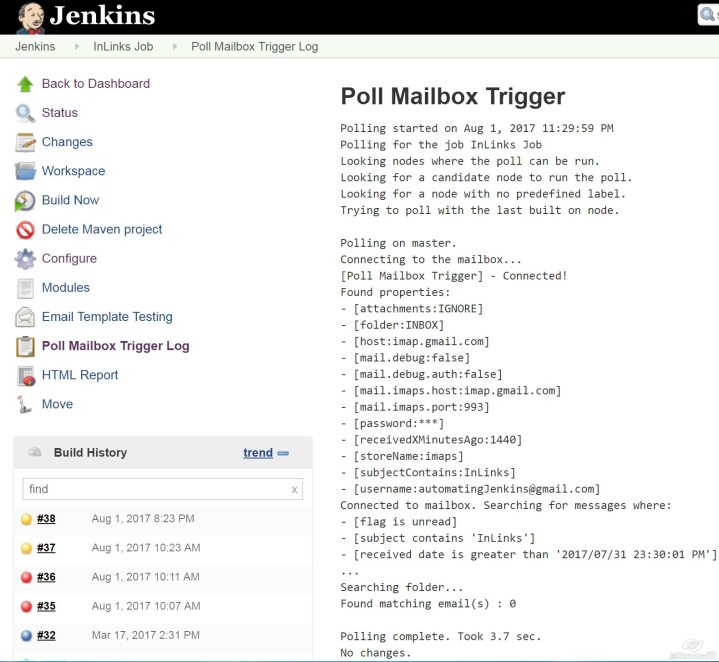
- As soon as a new email is received matching the set criteria, the plugin will pick it up during polling and start a new job and the email will be marked as Read so that it is not processed again.
Support
| Compatibility | Since Version |
|---|---|
| Java Runtime Environment | 1.7+ |
| Jenkins Server | 2.7.1 LTS |
| Mail Server Protocols | IMAP, IMAPS, POP3, POP3S |
 Flavours Of Testing